You may have heard of a “graph” as a pie chart (a budget?), a line graph (change of something over time?), a histogram (into which buckets do values fall?), or another type. In computer science and related fields of math (this time, not statistics), a “graph” doesn’t mean those tools for representing data, but instead means, roughly, “a set of dots connected by lines.”
A “dot” is called a node or a vertex, and a “line” is called an “edge.” The following is a
very simple graph, with 3 nodes and 3 edges.
![The graphs K3,3\documentclass[12pt]{minimal} \usepackage{amsmath ...](data:image/jpeg;base64,/9j/4AAQSkZJRgABAQEAeAB4AAD/2wBDAAoHBwkHBgoJCAkLCwoMDxkQDw4ODx4WFxIZJCAmJSMgIyIoLTkwKCo2KyIjMkQyNjs9QEBAJjBGS0U+Sjk/QD3/2wBDAQsLCw8NDx0QEB09KSMpPT09PT09PT09PT09PT09PT09PT09PT09PT09PT09PT09PT09PT09PT09PT09PT09PT3/wAARCAFoAWgDASIAAhEBAxEB/8QAHwAAAQUBAQEBAQEAAAAAAAAAAAECAwQFBgcICQoL/8QAtRAAAgEDAwIEAwUFBAQAAAF9AQIDAAQRBRIhMUEGE1FhByJxFDKBkaEII0KxwRVS0fAkM2JyggkKFhcYGRolJicoKSo0NTY3ODk6Q0RFRkdISUpTVFVWV1hZWmNkZWZnaGlqc3R1dnd4eXqDhIWGh4iJipKTlJWWl5iZmqKjpKWmp6ipqrKztLW2t7i5usLDxMXGx8jJytLT1NXW19jZ2uHi4+Tl5ufo6erx8vP09fb3+Pn6/8QAHwEAAwEBAQEBAQEBAQAAAAAAAAECAwQFBgcICQoL/8QAtREAAgECBAQDBAcFBAQAAQJ3AAECAxEEBSExBhJBUQdhcRMiMoEIFEKRobHBCSMzUvAVYnLRChYkNOEl8RcYGRomJygpKjU2Nzg5OkNERUZHSElKU1RVVldYWVpjZGVmZ2hpanN0dXZ3eHl6goOEhYaHiImKkpOUlZaXmJmaoqOkpaanqKmqsrO0tba3uLm6wsPExcbHyMnK0tPU1dbX2Nna4uPk5ebn6Onq8vP09fb3+Pn6/9oADAMBAAIRAxEAPwD2WiiigAooooAKKKKACiiigAooooAKKKKACiiigAooooAKKKKACiiigAooooAKKKKACiiigAooooAKKKKACiiigAooooAKKKKACiiigAooooAKKKKACiiigAooooAKKKKACiiigAooooAKKKKACiiigAooooAKKKKACiiigAooooAKKKKACiikyM4oAWikzS0AFFFFABRRRQAUUUUAFFFFABRRRQAUUUUAFFFFABRRRQAUUUUAFFFFABRRRQAUUUUAFFFFABRRRQAUUUUAFFFFABRRRQAUUUUAFFFFABRRRQAUUUUAFecfE34iTeG5k0rRwh1KVN8krDIhU9MD+8f0r0Y186fE2KaD4kan5+f3ojeMnum0AY/LH4V14GjGviIU57NkzdlczP8AhLPEn2j7R/b1/wCbnOfNOPy6V6z8M/iLP4kkk0rWAn9oxpvjlQYEyjrx2YV4jXT/AAxiln+JOmfZ85jDvKR2XaQc/mB+NfQ5zleHw+H9pTVmvxMqc23Zn0bRSDpS18mbhRRRQAUUUUAFFFFABRRRQAUUUUAFFFFABRRRQAUUUUAFFFFABRRRQAUUUUAFFFFABRRRQAUUUUAFFFFABRRRQAUUUUAFFFFABRRRQAUUUUAFeX/GLT7PVZdHsreLfr11MI7YqcYj/iLf7P8A9evSby7hsLOa6upBHBCheRz2AGTXA+AbObxJrl7411GMjzyYNOjb/lnCON34/wCPrTTcXdbgcT/wprxULny/M07ygced5pxj1xjNdV8HbCy0yTWLK4iMevW03l3Jc5Jjz8pX2/8ArV6gRkV554/tJ/DWuWPjXTkJ8giDUY1/5aQnjP4dPy9K2rYqtXSVSTYlFLY9DFLUFndw31nDdWziSCZA6OvQg8ip6wGFFFFABRRRQAUUUUAFFFFABRRRQAUUUUAFFFFABRRRQAUUUUAFFFFABRRRQAUUUUAFFFFABRRRQAUUUUAFFFFABRRRQAUUUUAFFFFABSMcDNLWV4l1638NaBd6ndEbIE+Vc/ff+FR9TQByHj67n8Ta7Y+CtNkZRMRPqMi/8s4RztP1/wAK72ztILGzhtrWMRwQoEjRegA6VyHw10G4tdPuNd1YbtW1hvPlLDlEPKr7euPp6V21ABUF7aw31nLa3MYkgmQpIh6FSMGp6KAPOvAV1N4b1y+8Fai5YQZn06R/+WkJ5K/h/jXotcT8StBuLvT7fXdJG3VtIbz4io5dByy+/rj6+tdB4b1238S6Faapan5J0yy5+444ZT9DmgDWooooAKKKKACiiigAooooAKKKKACiiigAooooAKKKKACiiigAooooAKKKKACiiigAooooAKKKKACiiigAooooAKKKKACiiigAooooATNebaoT8QPiDHpKEtomht5t2R92absn4dP++q6Lx/4mbw14fZrUb9SvG+z2cYGSZD3x7f4VL4G8Mjwt4chtHO+7k/fXUnUvIevPt0oA6IDHQAD0FLRRQAUUUUAIwyCOCD2NebaV/wAW/wDiHJpMh26LrjGW0J+7DN3T8en/AHzXpVc5458ML4p8Nz2qHbdxnzrWToVkHTntnpQB0QNLXL/D/wATt4m8PK918mo2jfZ7yMjBEg749/8AGuooAKKKKACiiigAooooAKKKKACiiigAooooAKKKKACiiigAooooAKKKKACiiigAooooAKKKKACiiigAooooAKKKKACiiigAprsEUszBVAyST0FKTiuF+JesXEkNp4X0hj/aWsN5ZI/5Zw/xMfrz+GaAKPh0Hx347uPEkyltJ0sm305T0d/4pP6/l6V6Tis7QtGt9A0W102zGIbdAoPdj3Y+5OTWjQAUUUUAFFFFABSHoaWigDzbxEreBPHVv4khBGlaoRb6io6Rv2k/z7+tejqwZQysCpGQQeCKo69o9tr+i3WmXi5huEKk91PZh7g4Ncn8NtXuY4bvwvq7Y1LR28sE/wDLWH+Fh9OPwIoA7yigdKKACiiigAooooAKKKKACiiigAooooAKKKKACiiigAooooAKKKKACiiigAooooAKKKKACiiigAooooAKKKKACiiigCrqV/b6Xptxe3jhILdDI7egFcR8OtOn1q/vfGeqx4uL8lLNG/5YwDgY+v8AT3qHxrPL4v8AFVn4Ms3b7LGRc6pIp6IOQn48fiRXodvBHbW8cMCBIo1Cog6KAMAUASUUUUAFFFFABRRRQAUUUUAIRkV5/wDEWwn0W/sfGeloWuNPIS8RR/rYDwc/TP6+1eg1FcQR3MEkE6B4pVKOjdGB4INAEWnahb6pp9ve2biS3uEEkbDuDVqvOfBM8ng/xTeeDL52Ns5Nzpcjn7yHkp9Rz+INejUAFFFFABRRRQAUUUUAFFFFABRRRQAUUUUAFFFFABRRRQAUUUUAFFFFABRRRQAUUUUAFFFFABRRRQAUUUUAFYni3xFB4X8O3WpT4LINsSH/AJaSH7q1tE4xXm0uPiF8RvK+/oXh98t3We49PfGP096ANj4b+HZ9I0eTUNTy+raq32m5ZvvLnlV/DP5n2rsqTHOc0tABRRRQAUUUUAFFFFABRRRQAUUUUAcd8RvDk+raOmo6YSmraU/2m1depxyy/jj8xWv4S8Qw+KfD1rqcOA0i7ZUHVJB94f57VsngGvNoP+Le/EUxfc0LxA2U7LBcensDn9R6UAelUUgpaACiiigAooooAKKKKACiiigAooooAKKKKACiiigAooooAKKKKACiiigAooooAKKKKACiiigAoopksqQxNLK4SNAWZj0AHJNAHK/ETxJJoWhrbWAL6rqLfZrRF6hjwW/DP54q/wCDvDUXhXw5baemGmH7yeT+/IfvH+n4VyvhCJ/GvjG78XXSH7BaE22mIw446yfz/E+1ekUAFFFFABRRRQAUUUUAFFFFABRRRQAUUUUAFYPjLw1F4q8N3GnMQsx+eCT+5IPun+n41vUhoA5L4d+JZNd0Jra/+XVdNb7Ndo3XcOA344/MGuurzfxfE/grxjaeLbVT9huyLbVI16YPST/Pce9eixSxzRo8bh0ZQysOhB5BoAfRRRQAUUUUAFFFFABRRRQAUUUUAFFFFABRRRQAUUUUAFFFFABRRRQAUUUUAFFFFABRRRQAVwHxH1O41Cay8H6SxF7qp/0hh/yygHUn0zg/gPeuw1jVrfQ9KutRvH2wWyF29T7D3JwPxrkPhvpVxeveeLdXX/T9WOYlP/LKD+ED64H4AUAdlpOm2+j6Xb6fZpsgt0CIPYd/qetXKQDFLQAUUUUAFFFFABRRRQAUUUUAFFFFABRRRQAUUUUAUtX0y31nTLiwvE3wXEZjcfXuPcda434cancafNeeD9Wc/bdLb/R3b/ltAfukfTI/Aj0rviM1wXxI0u5s2s/FukLm/wBJbMyj/lrBn5gfpk/gTQB31FUtH1W31vSrbULN98FzGHU+nqD7g8VdoAKKKKACiiigAooooAKKKKACiiigAooooAKKKKACiiigAooooAKKKKACiiigAoziisDxp4mj8KeHLi/IDTn93bx/35D0H9fwoA5bxW7eN/Gtt4UtnJ06yIutTdTwSPux/wCfX2r0WONYo0jjUKiAKqjsB0Fcr8PPDL6BoHnXxL6pft9pu3b7248hfwz+ZNdbQAUUUUAFFFFABRRRQAUUUUAFFFFABRRRQAUUUUAFFFFABTZI1ljZJFDIwKspHBB7U6igDzfwpI3gfxpc+FLliNOvibnTHY8An70f+fT3r0cVynxC8Mya/oHnWJKapYN9os5F+9uHJUfXH54q74L8TxeKvDdvfrhZx+7uI/7kg6j+v40Ab9FFFABRRRQAUUUUAFFFFABRRRQAUUUUAFFFFABRRRQAUUUUAFFFFABRRRQAhrzW2/4uF8RWu2+fQtAbZED92e49ffGP0HrWv8RvEFxpukw6VpeW1fVn+z26r1UHhm/DOM/4VueFfD9v4Y8PWumW/PlLmR+7ueWb86ANcdKWiigAooooAKKKKACiiigAooooAKKKKACiiigAooooAKKKKACiiigBrdK82ux/wr74iLdqNmh6++yXssFx6+wP9T6V6XWP4q8PQeKPD11pk+B5q5jf+445VvzoA1x0FLXF/DfxDcalpMul6rldW0l/s9wrHlgOFb9Mf/rrtKACiiigAooooAKKKKACiiigAooooAKKKKACiiigAooooAKKKKACorm4itbeWedwkUSF3duigDJNS1578Q76fXdTsvBelyETXpEl9Iv/ACygHPP16/l60AR+B7eXxb4kvPGd8hWHm20yN/4YxwX+p5/M16KBiq+n2MGm2MFnaRiOCBBHGo7AVZoAKKKKACiiigAooooAKKKKACiiigAooooAKKKKACiiigAooooAKKKKACkIzS0UAec+OYJfCfiay8aWKEw5Ftqcaj78Z4DfUcfkK9Bt7iK7t4p4HDxSoHRh0YEZBqPULC31OwuLO7jDwToY5FPcGuF+Hl9caFqd74K1Ry01kTJYyN/y1gPPH0/x9KAPQ6KQHNLQAUUUUAFFFFABRRRQAUUUUAFFFFABRRRQAUUUUAFFFITigDO1/Wbfw/ot1qV42IrdC2M/ePYD3J4rl/hrotytvdeJdXU/2prDeaQR/q4v4VH6H6Yqh4gJ8e+PoPD8RLaPpBE9+w6SSdk/p+fpXpCgKoCgAAYAHagBaKKKACiiigAooooAKKKKACiiigAooooAKKKKACiiigAooooAKKKKACiiigAooooAK4X4k6LdfZrXxLpCn+1NHbzBgcyxfxKfX1/Ou6pGAZSrAEEYIPegDP0DWbbxBolrqdm2YrhA2M8qe6n6HIrR615roJPgLx7P4flJXR9XYz2DHpHJ3T+n5etekjoKAFooooAKKKKACiiigAooooAKKKKACiiigAooooAK5rx14nHhfw5JcRDfeznybSMclpG6cd8da6QkAEkjA96820cf8J/8QJdakG/RdFYw2Sn7ssvd/wAOv/fNAHSeAvC//CM+HUiuDv1C5bz7yQ8lpDzjPt0/OumoFFABRRRQAUUUUAFFFFABRRRQAUUUUAFFFFABRRRQAUUUUAFFFFABRRRQAUUUUAFFFFABRRRQBzHj7wwfE3h14rc7NQtm8+zkHBWRecZ9+n5U/wAC+J/+Eo8OQ3Eo23sJ8i7jxgrIvXj3610hFea6wP8AhAPiDFrSAroutMIb0D7sU3Z/x6/99UAelUUgIIBBBB6EUtABRRRQAUUUUAFFFFABRRRQAUUUUAFFFV769h06zmu7pxHBAhkkc9gBk0Acf8SdbuILK38P6QSdW1h/JjC9Y4zwze3HH5+ldJ4c0O38OaHa6ZaAeXAgBbHLt3Y/U5rkPh/Zz+ItZvfGupxlXuiYbCNv+WcI4yPr/j616EBigBaKKKACiiigAooooAKKKKACiiigAooooAKKKKACiiigAooooAKKKKACiiigAooooAKKKKACiiigArL8RaFb+JNDu9MuwPLnTAbujdmH0NalFAHD/DXXbiezufD+rsRq2jt5Lhuskf8AC39Py9a7jOa87+IFlP4d1my8a6ZGWa2Ih1CNf+WsJ4yfp0/L0rvLG8h1Czhu7Vw8E6B42HcEZoAsUUUUAFFFFABRRRQAUUUUAFFFFAAa868e3U3ijxDZeCtPchJCLjUpE/5ZxDkL+P8A8TXXeKPEFv4Z0C61O5wVhX5E/vufuqPqawfht4fuLHTJ9a1UFtW1hvtEzEcop5VfbrnH+FAHX2trDZWsNtbxiOGFAiKOigDAFTUUUAFFFFABRRRQAUUUUAFFFFABRRRQAUUUUAFFFFABRRRQAUUUUAFFFFABRRRQAUUUUAFFFFABRRRQAUUUUAQ3dtDeWk1vcRiSGZCjof4geCK4DwHdTeGNfvfBeoOSsRNxpsjH/WRHnb+HX869EIzXFfEnw/cX2mQa1pXy6vpD/aIWUcuo5Zff1x9R3oA7UUtZPhnxBb+JvD1rqltgLMvzp/ccfeX8DWtQAUUUUAFFFFABRRRQAUVVv9TstMjEl/eW9sh6NNIEB/OuV8Y+OrWw8NO+iXcF7f3bfZrRbeQOfMbvx6f4UAZOoH/hYHxEj01fm0TQmElyR92afsvvjp+Br0lfuiuf8EeGU8LeHIbM/NdP+9upOpeQ9efbpXQgY6UAFFFFABRRRQAUUUUAFFFFABRRRQAUUUUAFFFFABRRRQAUUUUAFFFFABRRRQAUUUUAFFFFABRRRQAUUUUAFFFFABSEZpaKAPNbD/i33xDk05vk0PXW8y2PRYZ+6+2c4/EV6VXO+N/DKeKvDs1kvy3SfvbaTOCkg6c+/Ss3wd46tL/w0kmtXkFnf2bG2u0uJAh8xeM8+v8APNAHaUVUsNTstTjMlheW90g6tDIHA/KrdABRRRQAVleJ9aTw74dvdUkXeLeMsqf3m6AfmRWrXNfEPSJtc8E6jZWqlpygkjQdWKkNgfXFG4HzvqWo3eu30l/qk73FxIc/MflUegHYVDZyzaXfwX9g/lXNu4kRsZ5HtTI2DL3yOGBHINEjBFOfyr71YPAvB3srWvc5eafMfTHhPxFD4h8O2mp7o4mnT503fdccMPzFbX2mH/ntH/30K8v8J/CDSbnw1ZT63Hdi/lTzJFWYoFycgY9cYzWx/wAKZ8K/8873/wACWr4JpLY6juPtMP8Az2j/AO+hR9ph/wCe0f8A30K4f/hTPhX+5e/+BLUf8KZ8K/3L3/wJagDuPtMP/PaP/voUfaYf+e0f/fQrh/8AhTPhX+5e/wDgS1H/AApnwr/cvf8AwJagDuPtMP8Az2j/AO+hR9ph/wCe0f8A30K4f/hTPhX+5e/+BLUf8KZ8K/3L3/wJagDuPtMP/PaP/voUfaYf+e0f/fQrh/8AhTPhX+5e/wDgS1H/AApnwr/cvf8AwJagDuPtMP8Az2j/AO+hR9ph/wCe0f8A30K4f/hTPhX+5e/+BLUf8KZ8K/3L3/wJagDuPtMP/PaP/voUfaYf+e0f/fQrh/8AhTPhX+5e/wDgS1H/AApnwr/cvf8AwJagDuPtMP8Az2j/AO+hR9ph/wCe0f8A30K4f/hTPhX+5e/+BLUf8KZ8K/3L3/wJagDuPtMP/PaP/voUfaYf+e0f/fQrh/8AhTPhX+5e/wDgS1H/AApnwr/cvf8AwJagDuPtMP8Az2j/AO+hR9ph/wCe0f8A30K4f/hTPhX+5e/+BLUf8KZ8K/3L3/wJagDuPtMP/PaP/voUfaYf+e0f/fQrh/8AhTPhX+5e/wDgS1H/AApnwr/cvf8AwJagDuPtMP8Az2j/AO+hR9ph/wCe0f8A30K4f/hTPhX+5e/+BLUf8KZ8K/3L3/wJagDuPtMP/PaP/voUfaYf+e0f/fQrh/8AhTPhX+5e/wDgS1H/AApnwr/cvf8AwJagDuPtMP8Az2j/AO+hR9ph/wCe0f8A30K4f/hTPhX+5e/+BLUf8KZ8K/3L3/wJagDuPtMP/PaP/voUfaYf+e0f/fQrh/8AhTPhX+5e/wDgS1H/AApnwr/cvf8AwJagDuPtMP8Az2j/AO+hR9ph/wCe0f8A30K4f/hTPhX+5e/+BLUf8KZ8K/3L3/wJagDuPtMP/PaP/voUfaYf+e0f/fQrh/8AhTPhX+5e/wDgS1H/AApnwr/cvf8AwJagDuPtMP8Az2j/AO+hR9ph/wCe0f8A30K4f/hTPhX+5e/+BLUf8KZ8K/3L3/wJagDf8V+I4PDvhy91PdHI8Cfu03D5nJwo/M1813k8mq3s19fv5t1cOZJGxjJPtXrniz4Q6TbeGb2fRIrs30KeZGrzFw2DkjHrjNePxsHTIPPQivfyCjQq1Ze11fRMyqtpaFjTNRvNAvkv9Kne3uIjn5T8rD0I7j2r6X8Ma2niLw5Zaoi7PtEe5kzna3Qj8wa+X5G2oe5PAA6mvpH4e6PNofgjTbO6UrOEMkin+EsS2PwzSz+jQpV4qkrX3Ck21qdLRRRXgmoUhAOMjpS0UAcN4l+FGheIbuS8UTWN1Icu9uRtc+pU8Z/Km+HPhNoOg3cd3L51/cxnKNcEbVPqFHGfrmu7oquefLy307dAEAxS0UVIBRRRQAUUUUAFFFFABRRRQAUUUUAFFFFABRRRQAUUUUAFFFFABRRRQAUUUUAFFFFABRRRQAUUUUAFFFFABRRRQAUUUUAJiuE8R/CXQtevHu4zNYXEhzI1vja59Sp4z9K7yimpOLunYDhvDXwo0Hw9dpeN519dRnKPcEFUPqFHGa7gYpaKTberAKKKKACiiigAooooAKKKKACiiigAooooAKKKKACiiigAooooAKKKKACiiigAooooAKKKKACiiigAooooAKKKKACiiigAooooAKKKKACiiigAooooAKKKKACiiigAooooAKKKKACiiigAooooAKKKKACiiigAooooAKKKKACiiigAooooAKKKKACiiigAooooAKKKKACiiigAooooAKKKKACiiigAooooAKKKKACiiigAooooAKKKKACiiigD/9k=)
And this is another graph with 5 nodes and 10 edges.

These are both “connected” graphs, because they don’t have
any parts floating around in empty space, without any edges connecting the
stray vertices to the rest. More formally, there is only one “component” in
each of these graphs, a region of the graph connected by vertices and edges.
So much of computer science revolves around abstract objects
like these graphs, so let’s look at a few special graphs.
K-graphs are called “complete” and identified by their number of vertices. You’ve
already seen K5 and K3. Complete graphs have some number of vertices, and every
possible edge between them. The binomial coefficient,
using as inputs n and 2, gives the number of possible pairs of nodes to be
connected by edges, which is the number of edges in a K.
Cycles are graphs that form a closed loop. Like K-graphs, C-graphs (be careful:
complete is K, and cycle is C) are identified by the number of vertices
they have, which is also the number of edges. Think about what C7, or C32678
would look like.
So far, all the graphs we’ve seen have been undirected—that
is, there is no restriction on which way you move through a graph like there
would be in a road network with some one-way streets, allowing movement only in
that direction.
Every graph so far—every K and every C—has, deliberately or not, been cyclic. That is,
each one had contained a cycle. Take a minute to draw out, on a whiteboard or
on paper, a graph that does not have any cycles.
There is another category of graph called a bipartite graph. These graphs (from
“bipartite” = “two parts”) are defined with two numbers, not just one. There is
some group of vertices on the left, and another group on the right. A complete
bipartite graph, known as K(L,R), connects all the left vertices with all the
right ones, but has no left-left or right-right connections. The classic
example, K(3,3) is often framed as the following:
- Alice has a house
- She needs water
- She needs heat
- She needs electricity
- Bob has a house
- He needs water
- He needs gas
- He needs electricity
- Charlie has a house
- He needs water
- He needs gas
- He needs electricity
Alice, Bob, and Charlie all need to connect to the water
supply, get natural gas, and hook up to the meter. But Alice won’t take Charlie’s
gas, just like Bob won’t take Alice’s water, and so on.
K(3,3) looks like this:

People sometimes call a graph where there’s one central node
and all other nodes connect to it, and only to it, a “star(fish)” graph.
In many problems, the “degree” of a vertex, and, in directed
graphs, this usually split by direction, in versus out. The “degree” of a
vertex is the number of edges that come in, go out, or both (depending on if
you want to know “degree,” “in-degree,” or “out-degree).
There are two common problems which we’ll cover in future articles, but I’ll
introduce them now, and then, in the future, link to the articles working through
a solution:
- Does a graph have an Eulerian cycle (or equivalently, “Is the graph Eulerian?”)—does there exist a cycle through the graph using every edge exactly once
- Does the graph have a Hamiltonian path (or equivalently, “Is the graph Hamiltonian?”)—does there exist a path through the graph that consumes every vertex exactly once?
Try to answer these two questions, but be warned—start with
very small graphs, no bigger than any of the ones I’ve given as examples here. For
now, suffice it to say in plain English that these problems are known to be “very
hard.” In future articles coming up very soon, we’ll put some mathematical rigor
into how we can classify problems and solutions.
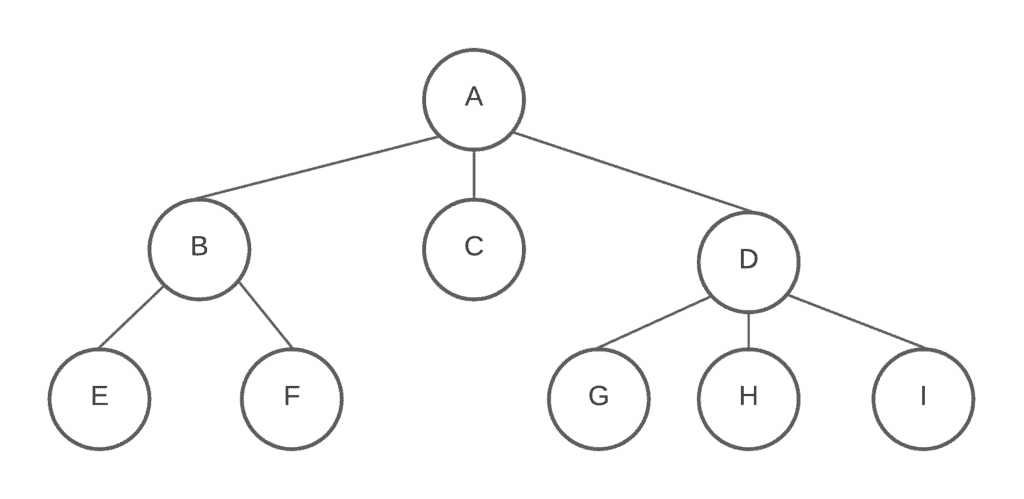
Finally, let’s single out a particular class of graph: one
which has no cycles or directed edges (and thus has exactly one path between any
pair of nodes; try to prove this yourself), and exists in only a single
component. They are called “trees” (they actually look like trees’ root systems, rather than what you see above ground), and they’re
some of the most important graphs in computer science. We will devote many
future articles to trees.